Zotero Cloud
Request Access
For my friends and family, I provide a Zotero cloud service. Fill in the form below to request an account — I will review and approve it personally.
Access is subject to approval. You do not need to do anything after submitting.
How to set up Zotero after approval
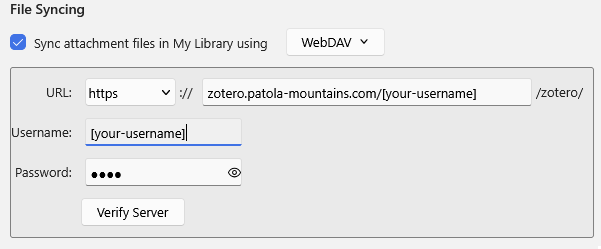
- Open Zotero and go to Edit → Settings → Sync.
- Under File Syncing, check Sync attachment files in My Library using and select WebDAV from the dropdown.
- Set the URL to
zotero.patola-mountains.com/[your-username]and leave the protocol set to https. - Enter your username and password as chosen during sign-up.
- Click Verify Server to confirm the connection works.
For more details, see the official Zotero File Syncing documentation.